





Onboarding is the first step to long-term customer success. A well-structured system can reduce churn, increase retention, and save costs. Poor onboarding leads to 20% of voluntary churn, while effective systems with automation cut costs by 22% and improve retention by 86%.
Here’s how to build a scalable onboarding process:
- Define success metrics like activation rates, onboarding completion, and retention.
- Segment customers into SMBs, mid-market, and enterprise for tailored experiences.
- Smooth handoffs from sales to onboarding with shared templates and clear communication.
- Automate workflows for account setup, data intake, and technical configurations.
- Kick off with training via tailored sessions, self-service resources, and progress tracking.
- Track progress with shared checklists and automated communication.
- Gather feedback at key milestones to refine processes.
- Scale with automation, real-time dashboards, and standardized tools.
- Ensure a seamless go-live with testing, quality gates, and hypercare support.
Key takeaway: A standardized and automated onboarding system doesn’t just save time – it directly impacts customer loyalty and growth. Start by mapping your processes, automating repetitive tasks, and continuously improving based on feedback.
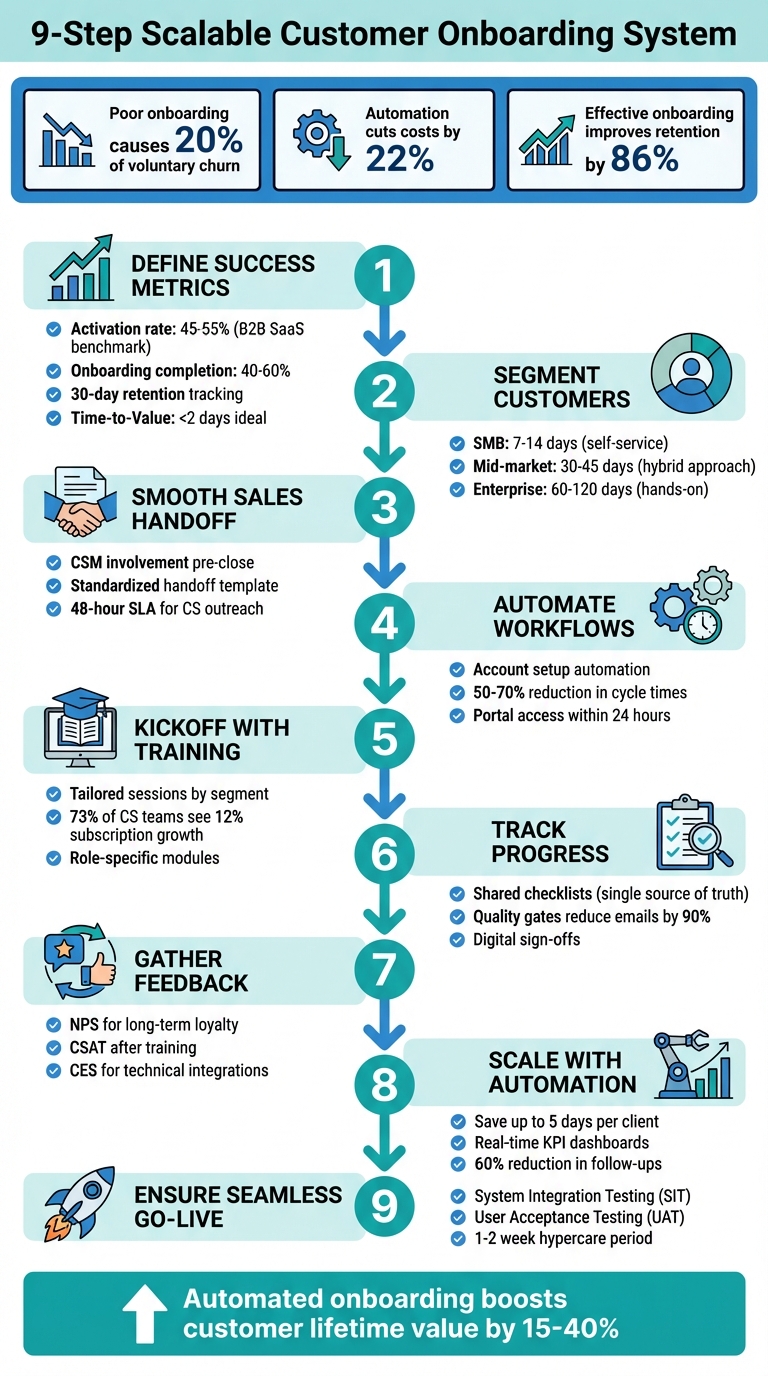
9-Step Customer Onboarding System Checklist for SaaS Companies
The Ultimate SaaS Onboarding Playbook with Justin Hammond
sbb-itb-ad881f4
Pre-Onboarding Preparation
Getting everything in place before the first customer login is crucial. This means setting clear expectations, aligning teams, and building a solid infrastructure. Skipping this step often results in wasted time fixing issues that could have been avoided.
Define Success Metrics and KPIs
Start by clarifying what "success" looks like for your onboarding process. Focus on key metrics like:
- Activation rate: The percentage of users who reach a core value event within 7 days.
- Onboarding completion rate: The percentage of users who finish all required steps.
- 30-day retention: A measure of how many users stick around after the first month.
- Step-level drop-off: Pinpoints where users abandon the process.
For B2B SaaS companies, activation rates typically range from 45% to 55% within 14 days, with completion rates between 40% and 60%. Also, track Time-to-Value (TTV) using median values instead of averages to avoid data distortion from outliers. A TTV of under 2 days is an ideal benchmark for most B2B workflows.
If you find that over 23% of users drop off between the first and second onboarding steps, you’ve identified a friction point that needs immediate attention.
"Onboarding is a powerful lever for dictating how customers use your product." – SuccessCOACHING
Segment Customers for Tailored Experiences
Not all customers have the same needs, so tailoring the onboarding experience with tailored consulting solutions is essential. Segment your customers based on revenue, complexity, and compliance requirements:
- SMB clients: They value speed. Aim for a 7–14 day activation cycle using self-service tools like automated intake forms.
- Mid-market accounts: A hybrid approach works best here. Assign a Customer Success Manager to guide them through milestone-based journeys over 30–45 days.
- Enterprise clients: These require a more hands-on approach, including strict compliance documentation (e.g., SOC 2, HIPAA) and gated approvals. Onboarding cycles can take 60–120 days.
For example, in 2024, Mexican ERP provider Bind ERP onboarded over 100 new customers monthly by segmenting clients and consolidating materials into shared workspaces. This allowed their lean Customer Success (CS) team to maintain consistency across different customer types. Similarly, hospitality SaaS platform Supy cut their average onboarding time by 25% by introducing visual, step-by-step workspaces tailored to specific restaurant segments.
This segmentation sets the stage for a scalable onboarding process that seamlessly transitions into account setup and training.
Ensure a Smooth Sales-to-Onboarding Handoff
The handoff from sales to onboarding is a common point where information gets lost. To avoid this, involve your Customer Success Manager in the sales process before the deal closes. This helps build trust and reassures customers about post-purchase support.
Use a standardized handoff template to capture critical details like client goals, challenges, product selections, special instructions, and immediate next steps.
"The Sales-to-Customer Success handoff shouldn’t feel like a handoff to the customer. Instead, the customer experience should feel like a single, seamless interaction with your company…" – The Dock Team
A shared digital workspace can be invaluable here. It stores customer goals, pain points, meeting notes, and recordings, ensuring nothing gets lost in translation. Additionally, have the Account Executive join the first kickoff meeting to reiterate the customer’s objectives and maintain continuity. To keep the momentum going, establish Service Level Agreements (SLAs) requiring Customer Success outreach within 48 hours of deal closure.
With these steps in place, you’ll be ready to move on to standardizing account setup and configuration.
Account Setup and Configuration
After pre-onboarding, the account setup phase kicks off customer access and system integrations. This is when customers start using your platform, upload their data, and connect your tools with their existing systems. Over 80% of enterprise organizations highlight onboarding as the key to delivering customer value. Getting this stage right lays the groundwork for a smooth and scalable onboarding experience. For companies scaling rapidly, a fractional CMO can provide the strategic leadership needed to align these processes with long-term growth goals.
Standardize Account Activation Processes
Scaling successfully means keeping things consistent. Avoid ad-hoc methods by documenting every step, decision point, and compliance requirement in a digital workflow. For example, once a contract is signed, automated triggers can send welcome emails, grant portal access, and assign training modules. This eliminates guesswork and ensures nothing is overlooked.
For enterprise clients, include critical steps like executing NDAs via e-signature and securing technical clearance from IT or Infosec teams. Establish clear communication channels and confirm key contacts early in the process. Companies using automated onboarding workflows report a 50% to 70% cut in cycle times.
Define SLAs – such as providing portal access within 24 hours – and use quality checkpoints (like "Contacts Authenticated") to keep the process moving. These measures help avoid delays and maintain momentum.
Once activation is automated, focus on gathering client data efficiently.
Streamline Intake Processes
Centralizing customer data, goals, and files in a single portal saves time and effort. Use passwordless login links so customers can easily submit data and sign documents without needing to create new credentials. This reduces friction and speeds up responses.
Take Insider, a global SaaS company, as an example. By automating CRM updates, follow-ups, and task tracking, they achieved a 35% decrease in onboarding time for their enterprise clients.
Automate follow-ups to remind clients about missing information or documents, cutting down on manual work. AI agents can pre-check document completeness, validate data, and provide real-time answers to common questions. Tailor the intake process based on client needs – self-service for low-touch clients and guided data collection for high-touch clients.
"We used to need a team of four full-time staff members to onboard clients. Since LaunchBay, a single person is all we need, and we’ve been able to move the other three team members to more revenue-focused roles." – Wade Lindquist, Rocketstay
With data collection streamlined, the final step is completing technical integrations.
Complete Technical Integrations and Configurations
Just like the setup phase, technical integrations should follow strict quality checkpoints to ensure a smooth handoff. This includes tasks like data migration, CRM integrations, and system configurations. Use integration connectors to sync data between your product and the client’s existing tools, such as their CRM, ERP, or document management systems. This eliminates manual bottlenecks and ensures data flows effortlessly.
Keep the initial sign-up process simple – just ask for a name, email, and password. Use onboarding wizards during the first login to walk users through setup. Features like Single Sign-On (SSO) and social logins (OAuth) allow one-click access, reducing friction.
Establish quality checkpoints to confirm each phase is complete before moving forward. For instance, ensure all required documents are uploaded and integrations are operational before marking the setup as finished. Conditional workflows can automatically adjust the onboarding path based on factors like client segment, region, or service type. This approach balances consistency with the flexibility needed for customization.
Kickoff and Training
The kickoff meeting sets the stage for a productive partnership, creating a foundation for a smooth journey while strengthening customer relationships.
Schedule and Execute Kickoff Meetings
Bring together the key players from both sides – this typically includes the Account Executive, Customer Success Manager, Technical Account Manager, the day-to-day Champion, and the Executive Buyer. Use this meeting to cover introductions, discuss customer pain points, review the technology, and align on clear success criteria. It’s also the perfect time to define response times, resource commitments, and troubleshooting protocols. Lay out a roadmap with critical milestones, set a timeline, and schedule regular syncs (weekly is a good starting point).
After the meeting, follow up with a summary email within 24 hours. This email should recap the discussion, outline action items, and include deadlines to keep everyone on track.
For example, Trovata, a cash management platform based in the U.S., streamlined its kickoff process and automated project setups, saving them over 50 administrative hours per month.
With a well-structured kickoff meeting in place, your team can shift focus to delivering targeted training sessions.
Provide Training Sessions
Customize your training approach based on the complexity of the customer’s needs. For enterprise clients, one-on-one specialist training works best, while SMBs may benefit more from automated webinars or pre-recorded video tutorials. Use behavioral triggers and role-specific modules to ensure learning is effective and manageable, avoiding information overload.
Research shows that 73% of customer success teams that integrate training during onboarding see a 12% boost in product subscription growth rates.
Take Infinx as an example. This healthcare-focused AI tool revamped its onboarding by adding structured dashboards and collaborative workflows, leading to a 20% productivity increase and a 15% improvement in its Net Promoter Score.
By offering effective training, you empower customers with the knowledge they need, paving the way for scalable, self-service support.
Create Self-Service Resources
Develop a centralized resource library to provide 24/7 support. Include a mix of searchable help articles, FAQs, technical documentation, on-demand video tutorials, and short clips focused on specific features. To make these resources even more user-friendly, add interactive in-app guidance, such as tooltips and walkthroughs, to assist users in real time.
Keep onboarding checklists concise – three to five key items are ideal – to avoid overwhelming users. It’s worth noting that 80% of users uninstall an app simply because they don’t know how to use it. Make sure your resource center is easy to find, perhaps through a sticky widget or a sidebar. Progress indicators like “2 of 4 steps completed” can also motivate users to complete tasks.
A great example comes from Supy, a hospitality SaaS platform serving over 3,000 restaurants. In 2024, they moved from email-based onboarding to a centralized resource hub, cutting average onboarding time by 25%. Similarly, Bind ERP combined documentation, video tutorials, and progress tracking into a single live workspace, enabling their lean Customer Success team to onboard over 100 new customers each month.
Track Progress and Maintain Communication
After customers complete their initial training, it’s crucial to keep an eye on their progress. Shared checklists can serve as a single source of truth, helping both your team and the customer stay aligned on task ownership, statuses, and upcoming steps. Tools like Velaris and Slack simplify task tracking, while client portals like Moxo offer easy access via "Magic Links." These links let customers view checklists and upload documents without the hassle of traditional logins. This transparency sets the stage for streamlined processes, as outlined below.
Implement Shared Checklists
A well-organized checklist can replace scattered emails, forms, and follow-ups with a more seamless and professional workflow. Introducing quality gates – clear checkpoints like "Kickoff Complete" or "UAT Passed" – ensures tasks are verified before moving to the next phase. These checkpoints often require digital sign-offs, which can reduce cycle times by 50–70% and cut back-and-forth emails by 90%.
To make checklists more effective, segment them by role. For example, administrators only see tasks relevant to their responsibilities, while end users view items specific to their needs. You can also integrate these checklists with your CRM. For instance, in Salesforce, checklists can be triggered automatically when a deal is marked as "Closed-Won", eliminating the need for manual setup. Companies that automate workflows like this often see a 22% reduction in costs.
Automate Communication Touchpoints
Tracking progress also enables smarter, more proactive communication. Swap out generic emails for behavior-triggered messages. For example, if a customer hasn’t completed a task by Day 3, send them a personalized reminder. It’s worth noting that welcome emails are particularly effective – 42% of companies use them, and 75% rate them as highly successful for engaging customers.
Internally, set up alert systems to notify your team (via Slack, for example) when a customer shows signs of low engagement. This allows for timely, human intervention instead of relying solely on automated follow-ups.
"A smart, vetted onboarding checklist can often be the difference between an engaged customer who has adopted your product and a disengaged user who’s close to churning."
- Grace Gupta, Senior Copywriter and Content Lead at Customer Success Collective
The next step is to systematically gather feedback to refine and enhance these processes.
Collect Feedback Regularly
Gathering feedback at multiple stages of the onboarding process – not just at the end – can provide valuable insights. For example, collect input after key milestones such as kickoff, technical setup, and first value achievement. Use different metrics for different moments:
- NPS (Net Promoter Score) to measure long-term loyalty at the end of onboarding
- CSAT (Customer Satisfaction) right after training sessions
- CES (Customer Effort Score) following technical integrations to assess ease of use
In-app surveys can also be deployed immediately after tasks are completed. Additionally, monitoring support tickets can help identify gaps in documentation or training. Most importantly, close the feedback loop by letting customers know when their suggestions lead to process improvements. This builds trust and encourages continued engagement.
Automation and Scalability
Once you’ve established effective progress tracking, the next step is scaling your onboarding process, and automation is key to making that happen. Automation strikes the balance between offering tailored experiences and maintaining profitability as your business grows. Research from Deloitte shows that automating core onboarding steps can save up to five days per client. Similarly, Bain‘s Automation Pathfinder Survey revealed that companies using automation reduce costs by 22%. By streamlining processes, automation allows you to scale without sacrificing personalization.
Automate Repetitive Processes
Start by mapping out each step of the onboarding process to identify tasks that require human involvement versus those that can be automated. High-impact opportunities for automation often include information collection and intake. For example, using standardized digital forms and file request tools can eliminate the need for manual follow-ups. Tasks like account provisioning – creating user accounts, assigning licenses, and setting permissions – can also be automated as soon as a contract is signed.
Communication workflows are another area ripe for automation. Set up behavior-triggered sequences for actions like sending welcome emails or task reminders. Calendar tools can be integrated to let clients schedule kickoff meetings or training sessions automatically once they’ve completed prerequisite steps. Automated quality checkpoints can also significantly reduce cycle times – by as much as 50%.
Establish Real-Time KPI Dashboards
Real-time dashboards are invaluable for tracking progress, hitting milestones, and identifying bottlenecks early. For clients, having visibility into their own onboarding status can reduce the back-and-forth of manual follow-ups by up to 60%. For your team, dashboards offer insights into where tasks are stuck or service-level agreements (SLAs) are being missed, enabling you to proactively address issues.
Set up trigger alerts for critical metrics, such as when specialist utilization exceeds 85% or tasks fall behind schedule. Focus on tracking outcome-driven KPIs like Time-to-First-Value (TTFV) and product adoption rates, rather than just activity-based metrics like the number of meetings held.
"If it’s not measured, improvement becomes guesswork"
- The Moxo Team
Standardize Tools and Documentation
Fragmented systems can slow down workflows and confuse clients. To avoid this, centralize tasks, documents, and communication into a single, reliable platform – whether that’s your CRM, a client portal, or a workflow orchestration tool. Use APIs to integrate essential systems, such as CRM platforms, compliance tools, e-signature software, and finance systems. This ensures onboarding can be triggered directly from "Closed Won" deals and billing can be verified seamlessly.
Reusable workflow templates are another way to save time and ensure consistency. These templates can reduce setup time from hours to mere seconds. Keep in mind that different customer segments require distinct approaches: SMB clients often benefit from highly automated, self-service onboarding journeys (aiming for 7–14 day timelines), while enterprise clients typically need more structured, governance-heavy workflows that span 60–120 days. The goal isn’t to replace human interaction but to let automation handle routine tasks, allowing your team to focus on what matters most.
Go-Live and Transition to Support
The go-live phase marks the shift from setup to actual usage. At this stage, 74% of customers may switch to a competitor if the process feels overly complicated. Ensuring a smooth transition requires careful validation, clear communication, and a plan for sustained success.
Conduct Final Testing and QA
Before going live, thorough testing is essential to catch any issues early. Start with System Integration Testing (SIT) to confirm integrations function as intended and assess how the system handles peak loads or failures. Follow this with User Acceptance Testing (UAT), where real users test standard workflows and edge cases using migrated data.
Data migration should be validated meticulously through trial runs, comparisons, and spot checks. Ensure role-based permissions are correctly configured – avoid assigning overly broad "System Admin" roles unless absolutely necessary. Once live, perform smoke testing to confirm critical features are stable.
A go/no-go meeting with decision-makers is crucial to review test outcomes and unresolved defects. As Elizabeth Harrin from RebelsGuideToPM.com emphasizes:
"Having the vendor be part of rollout planning isn’t enough. Verify their resource availability. Trust but verify".
After going live, implement a hypercare period lasting one to two weeks, with daily stand-ups to quickly address early issues before transitioning to standard support.
Review Success Milestones
Hold a final review meeting to confirm readiness after testing. Use Quality Gates – defined earlier in the project – to turn subjective milestones into clear, measurable checkpoints. For example, a phase is only complete when deliverables like UAT completion or security reviews are validated and approved. Document Time to Value (TTV) and connect project goals to ROI using pre- and post-implementation benchmarks.
Formalize the handoff between the onboarding specialist and Customer Success Manager (CSM) in a dedicated meeting. This ensures success criteria are reviewed, unresolved issues are addressed, and customer insights are transferred. Use eSignatures to capture digital sign-offs for final "Go-Live" approvals, creating a clear and auditable record. Deploy CSAT or NPS surveys at the end of onboarding to identify any remaining friction before moving the customer to standard support.
Plan for Retention and Growth
Go-live isn’t the end – it’s the beginning of a long-term relationship. Create a success plan that outlines key milestones, strategies, and ROI measurement at 30, 60, and 90 days. Schedule the first Quarterly Business Review (QBR) during this transition phase to maintain momentum and align on future goals.
From day one, monitor usage, adoption, and customer sentiment to identify churn risks or growth opportunities. Use the final review meeting to evaluate readiness for deeper engagement, such as upselling additional features or cross-selling related services. Automate follow-ups for renewals, check-ins, or alerts when engagement drops below a certain threshold. Remember, 86% of customers are more likely to stay loyal to a brand that invests in onboarding content that welcomes and educates them.
This phase is critical for bridging onboarding with long-term customer success, ensuring a smooth transition from setup to ongoing value.
Conclusion
Creating a scalable onboarding system requires constant fine-tuning and attention to detail. As Matt Collis from Tailored Edge Marketing aptly puts it:
"The difference between chaos and compounding growth is a system. Map the journey, automate intake, set firm expectations, and instrument the loop so it gets sharper every month".
Inefficient onboarding is one of the leading causes of early churn and user drop-off. On the flip side, the potential benefits are hard to ignore: companies that incorporate automation into their workflows see 22% lower costs, and well-optimized automated onboarding can boost customer lifetime value by 15% to 40%.
The checklist provided highlights how a well-structured system can yield consistent results. To achieve this, focus on three key areas:
- Standardize your processes to ensure any team member can deliver the same high-quality experience.
- Automate where it makes sense – use technology to handle repetitive tasks while reserving human interaction for building relationships and solving more complex issues.
- Commit to ongoing improvement by holding monthly reviews, maintaining version-controlled playbooks, and setting clear signals for when to scale or refine your approach.
In 2024, companies like Bind ERP and Insider set a high bar by overhauling their onboarding systems. They scaled to onboard over 100 new customers monthly and reduced onboarding time by 35% – all by streamlining workflows and leveraging automation. These aren’t isolated examples; they show what’s achievable when businesses shift from reactive problem-solving to proactive system design.
Take these priorities and embed them into your strategy. Strengthen your processes with every new customer. Use the quality checks and automation strategies outlined here, and revisit them regularly – every 30 days is a good benchmark. Success doesn’t come from having flawless systems from the start. It comes from building systems designed to adapt and improve over time.
FAQs
What are the best ways to measure the success of my customer onboarding process?
To gauge how well your customer onboarding process is working, focus on metrics that highlight engagement and satisfaction. Here are the key ones to keep an eye on:
- Onboarding completion rates: This tells you how many customers make it through the entire onboarding process. A high rate suggests your process is straightforward and engaging.
- Time to value: This measures how quickly customers start experiencing the benefits of your product or service. The faster they see value, the better.
- Retention and churn rates: Track how many customers stick around versus those who drop off. Retention is a strong indicator of onboarding success.
- Feature adoption: Look at how well customers are using important features of your product. This can reveal whether they’re fully understanding and benefiting from your offering.
- Customer effort score (CES): This metric reflects how easy or difficult it is for customers to navigate the onboarding steps. A lower effort score means a smoother experience.
- Support ticket rates: Keep tabs on how often customers need assistance during onboarding. A high number of tickets might indicate confusing steps or unclear instructions.
By regularly reviewing these metrics, you can pinpoint what’s working and what needs tweaking to keep your onboarding process effective and scalable.
Why is customer segmentation important during onboarding?
Segmenting customers during onboarding allows businesses to craft experiences that genuinely meet individual needs. This personalized strategy increases engagement, encourages faster product adoption, and lowers churn rates – all of which contribute to retaining customers over the long haul.
By identifying and understanding various customer segments, companies can provide more targeted communication, simplify workflows, and make every customer feel valued and supported. The result? Higher satisfaction levels and a solid framework for sustainable growth.
How can automation enhance the customer onboarding process?
Automation simplifies customer onboarding by cutting down on manual tasks, ensuring everything runs smoothly, and keeping clients engaged along the way. By automating repetitive steps, companies can save time, avoid mistakes, and concentrate on delivering a smooth and enjoyable experience.
With well-organized workflows, automation keeps new customers informed and aligned, speeding up activation and boosting satisfaction. This approach not only enhances efficiency but also sets the stage for growth while maintaining top-notch service quality.



0 Comments