





Automated marketing workflows save time by handling repetitive tasks like follow-up emails or cart recovery. These workflows are triggered by specific actions (e.g., form submissions or email clicks) and follow an "if-then" logic to guide prospects through the marketing funnel. Businesses using automation see 80% more leads and 77% higher conversion rates, while reducing manual effort.
Here’s how to set up automated workflows:
- Set Goals & Map Your Funnel: Identify weak points in your customer journey and set measurable goals like improving lead-to-sale conversions.
- Define Triggers: Triggers include actions (e.g., downloading a guide), behaviors (e.g., cart abandonment), or time-based events (e.g., birthdays).
- Connect Tools: Integrate your CRM, email, and analytics platforms to ensure smooth data flow and accurate tracking.
- Test & Refine: Run internal tests, monitor performance metrics, and adjust workflows to improve results.
Automation ensures consistency, improves response times, and allows teams to focus on strategy instead of manual tasks. By following these steps, you can create workflows that increase efficiency and drive revenue.
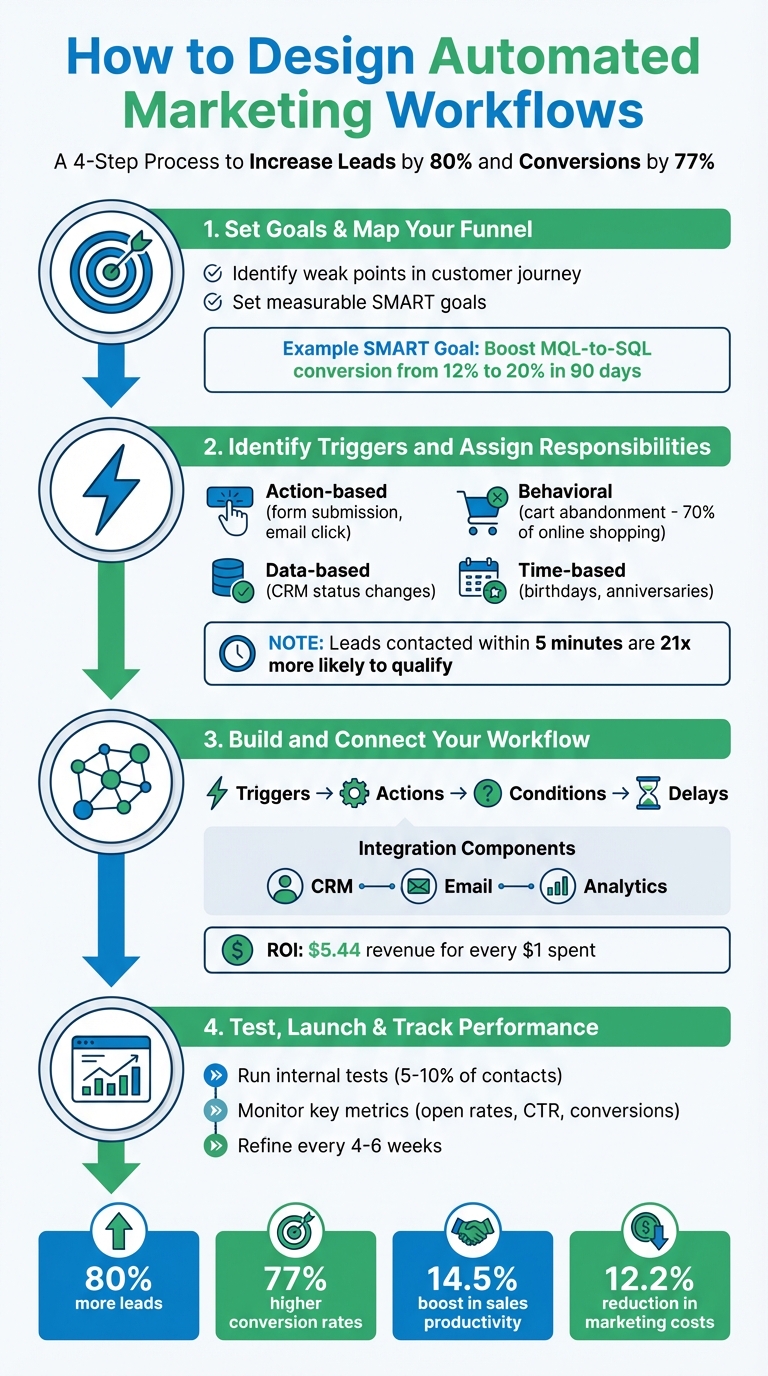
4-Step Process for Designing Automated Marketing Workflows
Automation Workflow Design: Start from the End
Step 1: Set Goals and Map Your Marketing Funnel
Before diving into workflows, it’s essential to pinpoint your goals and the weak spots in your funnel. Without a clear plan, automation can end up reinforcing inefficiencies rather than solving them.
Set Clear Objectives
Aiming for something vague like "generate more leads" won’t cut it. You need specific and measurable goals tied directly to your CRM and revenue metrics. The SMART framework can help: instead of general ambitions, set precise targets like, “Boost MQL-to-SQL conversion from 12% to 20% in the next 90 days”.
Start by auditing your processes to uncover bottlenecks. Who owns each workflow? Where are things breaking down? For instance, are leads slipping through the cracks between marketing and sales? Is manual data entry eating up hours every week? Identifying these issues helps you focus your automation efforts where they’ll have the most impact.
Here’s an example: If your sales team isn’t alerted about high-value cart abandonments until hours later, a better goal might be, “Notify sales within 5 minutes of a high-value cart abandonment.” The numbers back this up – 35% of companies adopt marketing automation to streamline marketing and sales alignment, while 28% focus on capturing more leads. Keep your objectives tied to meaningful outcomes, not vanity metrics like email volume.
Map the Customer Journey
Once you’ve set clear goals, the next step is to map out your customer journey in detail. Break it down into every stage of your funnel: Awareness, Evaluation, Purchase, Onboarding, Retention, and Advocacy. This mapping process highlights where prospects drop off and where automation can fill the gaps.
At each stage, identify key behaviors – like downloading a pricing guide – that signal a prospect is ready to move forward. These behaviors will serve as triggers for your workflows. Before you even open your automation tool, sketch out the flow: What action starts the sequence? What comes next? When does the process end?
This preparation pays off. 77% of buyers expect personalized, relevant content at every stage of their journey. By mapping the journey first, you ensure your automated messages fit the buyer’s actual needs and position – not where you assume they are. Businesses that do this effectively generate 80% more leads and see conversion rates jump by 77%.
| Funnel Stage | Automation Opportunity | Key Trigger Example |
|---|---|---|
| Awareness | Welcome Series / Lead Magnets | Newsletter signup or form submission |
| Evaluation | Lead Nurturing / Case Studies | Downloading a product guide or whitepaper |
| Purchase | Abandoned Cart Recovery | Item added to cart but no checkout |
| Onboarding | Training / Setup Guides | Account creation or first-time purchase |
| Retention | Re-engagement / VIP Rewards | Inactivity for 60+ days or customer anniversary |
| Advocacy | Feedback / Referral Requests | Product delivery or support ticket resolution |
Once you’ve mapped the journey, it’s time to define triggers and assign responsibilities to ensure nothing falls through the cracks.
Step 2: Identify Triggers and Assign Responsibilities
Once you’ve mapped out your customer journey, the next step is to determine the actions that will activate each workflow and assign clear responsibilities for the follow-up. This ensures that all departments are on the same page and eliminates confusion.
Define Workflow Triggers
Triggers are the specific actions or behaviors that set your automated workflows in motion. Think of them as "if/then" statements: when a customer does something, it prompts an automatic response.
- Action-based triggers respond instantly to customer interactions, like filling out a form, clicking an email link, downloading a lead magnet, or completing a purchase.
- Behavioral triggers monitor patterns over time, such as visiting your pricing page multiple times or showing signs of leaving your site (exit-intent). Negative triggers, like cart abandonment – which happens in nearly 70% of online shopping experiences – are also crucial for re-engagement.
- Data-based triggers activate when something changes in your CRM. For example, a lead’s status updates to "qualified", a deal moves to "closed-won", or a contact is added to a priority list.
- Time-based triggers are tied to specific dates, such as birthdays, subscription renewals, or anniversaries. These are particularly effective – leads contacted within five minutes are 21 times more likely to qualify than those reached after a 30-minute delay.
Here’s a quick breakdown of how different triggers connect to workflow results:
| Trigger Category | Specific Action Example | Typical Workflow Result |
|---|---|---|
| Conversion | Filling out a form or downloading a lead magnet | Welcome or lead nurture sequence |
| E-commerce | Adding an item to the cart but not checking out | Abandoned cart recovery sequence |
| Engagement | Clicking links to "Sales" or "Pricing" pages | Lead score update or sales team alert |
| Retention | 60 days of inactivity (no logins or email opens) | Re-engagement or win-back campaign |
| Transactional | Completing a purchase | Order confirmation and onboarding tips |
| Milestone | Customer’s birthday or signup anniversary | Special discount or celebration email |
To maximize efficiency, use lead scoring to trigger workflows when a prospect reaches a high-intent threshold.
Align Teams for Execution
Defining triggers is only part of the equation – execution depends on team alignment. Without clear ownership, even the best automation strategies can fall apart.
Marketing teams typically design the customer experience, focusing on content, messaging, and timing. Operations teams handle the technical side, like setting up data flows and platform integrations. Sales teams need clear handoff protocols, often outlined in Service Level Agreements, to ensure they know when and how to act on qualified leads.
Start by auditing your workflows. Create a simple table with three columns: "Workflow", "Owner", and "Pain Point." This helps pinpoint where manual tasks are causing delays. For instance, if demo requests aren’t reaching the sales team promptly, operations can set up an automated Slack or CRM notification to fire the moment a request is submitted.
"Usually, marketers will create a vision for the customer experience, and the operations professionals will provide the technical and operational expertise to automate the process." – ActiveCampaign
To avoid confusion, use exclusive gates to ensure contacts only appear in one team’s queue at a time. For example, when a lead’s score hits a qualifying number, they should automatically move from a "Marketing Nurture" workflow to a "Sales Sequence." Naming conventions for lists and workflows also help teams quickly identify and manage assets. Companies with this level of coordination report 77% higher conversion rates and generate 80% more leads.
Visual workflow tools can help map out responsibilities and identify where handoffs occur. Before launching, conduct a cross-departmental quality check to ensure every trigger and notification works as planned. When teams are aligned, automation becomes a powerful tool for driving revenue.
With triggers and responsibilities clearly defined, you’re ready to move on to building and connecting your workflows.
For more tips on optimizing automated workflows and team collaboration, visit Graystone Consulting (https://graystonellc.net).
sbb-itb-ad881f4
Step 3: Build and Connect Your Workflow
Now that you’ve mapped out your funnels and pinpointed triggers, it’s time to set up the automated system that will drive your conversions forward.
Design Workflow Logic and Timing
Every effective workflow is built on four key elements: triggers, actions, conditions, and delays. Start by sketching out your workflow on a digital whiteboard tool like Miro or Lucidchart. This step helps you visualize the process and identify any gaps. For example, if someone downloads your lead magnet, you could delay the next email by 24 hours. If they click on a link to your pricing page, the sequence can branch, sending them a sales-focused message instead of additional nurturing content.
Conditional logic is where workflows get interesting. Let’s say a customer spends over $50 – they could be funneled into a VIP onboarding sequence. If they spend less, they get standard follow-up emails. To avoid overwhelming your audience, set clear timing rules, like waiting 24–48 hours between sending an email and a follow-up SMS.
It’s best to start small. Focus on high-impact workflows like welcome sequences before diving into more complex setups, such as multi-channel coordination or predictive routing. Mike Morrow, founder of Morrow Audio, shared how automation transformed his business:
"With all of the automations that we’re using, the store runs by itself. I’m able to focus on other projects."
Once your workflow logic is outlined, the next step is integrating your tools for smooth execution.
Connect Your CRM, Email, and Analytics Tools
Your workflow is only as good as the data flowing through it. Start by cleaning your data – remove duplicates, standardize formats, and fill in any missing details. Then, connect your CRM, email platform, and analytics tools to enable seamless data sharing. This integration ensures conversion events are tracked back to your CRM, allowing you to focus on actual results rather than vanity metrics like clicks.
To track performance accurately, use consistent UTM tags across all channels. When a lead submits a form, they should appear instantly in your CRM via API or webhook. Suppression lists are another must-have – they automatically stop workflows once the desired action is completed. For instance, if someone makes a purchase, an abandoned cart reminder should halt immediately.
By combining marketing strategy with operational precision, companies can see impressive results. Research shows businesses with well-integrated systems generate 80% more leads and achieve 77% higher conversions. Plus, marketing automation can deliver an average of $5.44 in revenue for every $1 spent over three years.
With your systems connected, it’s time to bring your workflow to life using visual tools.
Use Visual Workflow Builders
Drag-and-drop workflow builders make it easy to set up automation without writing a single line of code. Platforms like HubSpot and ActiveCampaign offer intuitive visual editors where you can map out triggers, actions, and conditions in one place. For example, HubSpot’s editor includes a minimap for navigating complex workflows and even uses AI-powered tools like Breeze Assistant for faster setup. ActiveCampaign simplifies the process further with pre-built templates (or "automation recipes") for tasks like welcome emails or abandoned cart reminders.
You can also use tools like Miro or Lucidchart to outline your workflows before building them. For advanced routing – such as assigning leads based on company size, tech stack, or behavior – consider integrating a decision intelligence layer via API to handle more intricate rules.
Before rolling out any new workflow, test it with a small group of contacts to catch setup issues. Setting up automatic alerts (via Slack or email) for key metrics like click-through rates can help you monitor performance and make quick adjustments if needed.
For businesses looking to scale their marketing systems with connected tools and real-time analytics, companies like Graystone Consulting (https://graystonellc.net) offer audits and growth system setups to optimize your automated workflows.
Step 4: Test, Launch, and Track Performance
Your workflow is ready and connected – now comes the crucial step of ensuring everything works smoothly before rolling it out to your entire audience.
Run Internal Tests
Before going live, take advantage of your platform’s "Test criteria" feature to confirm that contacts, deals, or tickets meet the starting conditions. Use simulation tools to preview how the workflow will function without triggering actual events. For email workflows, send preview emails to your own inbox to check formatting, links, and any personalization tokens – this helps you catch errors like broken merge fields before your audience encounters them.
Pay special attention to re-enrollment settings. If a workflow is meant to run only once per contact, failing to configure this properly can result in duplicate messages or missed opportunities. Adding conditional logic to ensure workflows only activate when key data fields are complete and reviewing timing settings (e.g., avoiding follow-ups at odd hours like 2:00 AM) can help avoid these issues.
Start with a small test group – about 5–10% of your contacts – to evaluate performance in a controlled environment. Once you’re confident in the internal setup, it’s time to move to real-world testing.
Launch and Monitor Key Metrics
After successful testing, launch your workflow to a limited audience and start tracking performance metrics. Keep an eye on engagement indicators like open rates and click-through rates to see how well your subject lines and content connect with your audience. Conversion metrics, such as the progression from Marketing Qualified Leads (MQLs) to Sales Qualified Leads (SQLs) and the overall lead-to-customer rate, provide deeper insights into how well your workflow is driving results.
Identify drop-off points in the workflow to pinpoint where users may be exiting before completing the desired action. A high drop-off rate at a specific step could indicate a bottleneck or an issue with the workflow’s logic. Use dashboard filters to compare different workflow versions and analyze how changes to triggers or messaging impact performance. Keep an eye on error counts and unsubscribe rates – if unsubscribe rates exceed 1%, it could signal a problem that needs immediate attention.
For long-term success, focus on business impact metrics like Customer Acquisition Cost (CAC) and Customer Lifetime Value (CLV). Marketing automation has proven benefits, with businesses earning an average of $5.44 for every $1 spent over three years. Additionally, companies using automation report a 14.5% boost in sales productivity and a 12.2% reduction in marketing costs.
Refine Based on Data
Review your workflow’s performance data every 4–6 weeks to identify trends and areas for improvement. Compare results against your original SMART goals. For instance, if your goal was to increase MQL-to-SQL conversions from 12% to 20%, check if you’re making progress. If engagement drops after a delay step or leads take too long to convert, it could indicate that they’re getting stuck in the process.
Make adjustments to triggers, timing, or messaging based on the data, ensuring these refinements align with your original workflow mapping. Then, test the updated workflow again. Remember, automation isn’t a one-and-done setup – it’s an evolving system that becomes more effective with ongoing tweaks and optimizations.
If you’re looking to scale your marketing systems and ensure your workflows deliver consistent results, Graystone Consulting offers fractional CMO services and growth system audits. Learn more at Graystone Consulting.
Conclusion
A streamlined automated workflow transforms the way your marketing funnel operates. By removing inefficiencies and running consistently without manual input, automation ensures your processes are both efficient and scalable. The key lies in setting clear objectives, mapping the customer journey, defining specific triggers, and integrating your tools into one cohesive system.
The numbers speak for themselves: companies leveraging marketing automation see 80% more leads, achieve 77% higher conversion rates, and experience a 14.5% boost in sales productivity, all while cutting marketing overhead by 12.2%. These results highlight how automation replaces repetitive tasks with systems designed to scale effortlessly.
"When you automate a workflow, you’re codifying your best practices into a system that executes perfectly every time." – Aprimo
FAQs
What are the best triggers to use in automated marketing workflows?
The best triggers for automated marketing workflows are those that align with customer actions, timing, or specific conditions. Let’s break it down:
- Behavioral triggers: These are based on what a customer does, like opening an email, clicking a link, or leaving items in their cart. They let you follow up in a way that feels timely and relevant.
- Time-based triggers: Think of reminders or messages sent on a customer’s birthday or when their subscription is about to renew. These are great for keeping the connection alive during key moments.
- Demographic triggers: These use customer details like location or preferences to tailor messages that resonate with individual needs.
- Event-based triggers: Actions like submitting a form or downloading content can automatically kick off specific workflows, ensuring the right message reaches the customer at the right time.
By tapping into these triggers thoughtfully, businesses can craft smooth, tailored experiences that truly resonate with their audience.
How do I make sure my automated marketing workflows work seamlessly with my sales team?
To make sure your automated marketing workflows work hand-in-hand with your sales team, start by tying them directly to your sales goals. Focus on areas like lead qualification, nurturing, and conversion. This connection ensures that marketing efforts actively support sales objectives.
Set up triggers and actions that align with each stage of your sales process. For instance, you can use form submissions or user behavior to automatically qualify leads for follow-up by your sales team. Collaboration is key – regularly review and tweak these workflows based on feedback from both marketing and sales teams to keep things running smoothly.
Lastly, implement shared metrics and reporting. By tracking progress together, you can measure success, encourage teamwork, and ensure your workflows drive real results.
What metrics should I track to measure the success of my automated marketing workflows?
To understand how well your automated marketing workflows are performing, focus on tracking a few key metrics that offer clear insights:
- Conversion rates: This shows how effectively your workflow is turning leads into paying customers. A higher conversion rate usually means your funnel is working smoothly.
- Revenue impact: Look at how much revenue your automated campaigns are bringing in. For instance, automated emails often outperform manual ones when it comes to driving sales.
- Engagement metrics: Keep an eye on open rates, click-through rates, and other engagement stats. These numbers reveal how your audience interacts with your campaigns.
- Efficiency gains: Measure the time saved and the reduction in manual tasks. These improvements highlight how much your workflow is streamlining operations.
By keeping tabs on these metrics, you’ll be able to tweak and refine your workflows to boost engagement, improve conversions, and achieve consistent growth.



0 Comments